





We also considered 10 others:


Our Top Choice
Compare Features


The order above is not editorial opinion, and it is not paid placement. It comes from what shoppers across our network actually do - which dash cameras they compare, and which they ultimately buy. We re-rank as new data comes in, so the long-term favorites have to keep earning their spot against new entrants. The full method, including how we make money.
Dash Cameras Buyer's Guide
Buying a dash camera is a tradeoff between capturing legally useful evidence and installing something that will keep recording correctly through heat, vibration, night driving, and memory-card wear. The sharpest checks are whether the camera can read signals, lanes, and plates in your real driving conditions, and whether it will reliably power on, loop-record, and save locked clips when an incident happens.
Video
You want a dash camera that captures enough detail to make footage useful, not just record that something happened. Look for clear daytime video, readable license plates, balanced exposure, and strong low-light or night performance without excessive glare, blur, or grain. Be wary of cameras that advertise high resolution but deliver poor visibility in motion or in challenging lighting, since real-world recording quality matters more than specs alone.
Prioritize real evidentiary detail over headline resolution: look for readable plates at reasonable following distances, clear traffic-light color, lane markings, timestamps, and usable rear footage, especially at night or in rain. For rideshare, family, or fleet use, consider cabin recording; for ordinary commuting, front-and-rear coverage is usually more useful than ultra-wide footage that distorts plates at the edges. Owner feedback supports this focus: shoppers consistently praise clear daytime and nighttime front/rear video, crisp multi-camera views, wide road coverage that is easy to review, and enough detail for traffic-light, lane-change, and plate disputes.
Reliability
A dash camera only helps if it records when you need it, so you should look for consistent startup, stable recording, and dependable saving of footage after bumps or sudden power loss. Pay attention to reports of overheating, random shutoffs, corrupted files, weak battery or capacitor behavior, and poor performance in everyday driving conditions, since these issues can leave gaps right when evidence matters most.
Choose a dash cam that starts recording automatically every time the vehicle powers on, loop-records without gaps, tolerates heat, and uses a high-endurance memory card rather than relying on a standard card that may fail silently. Check for stable mounts, firmware that does not freeze, reliable rear-camera connection, and clear indicators that recording is active, because a dash cam that misses startup or corrupts clips is useless after a crash. Owner sentiment aligns with this: many buyers describe dependable, compact, no-fuss units that start quickly, keep working after installation, and are trusted enough for everyday protection or multiple vehicles.
Features
Features matter because they determine whether a dash camera simply records or actively helps you drive, park, and review incidents more easily. Look for useful tools like parking monitoring, emergency recording, GPS, voice control, rear or cabin views, and backup or mirror camera modes if they fit your vehicle and habits. Watch out for extras that sound impressive but are hard to use, poorly integrated, or require separate accessories to work.
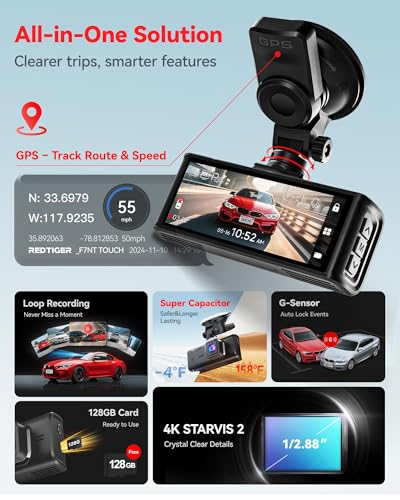
Match features to how you will actually use the footage: GPS/speed stamps can strengthen context but may expose your own speed, parking mode usually requires hardwiring or an external battery, Wi‑Fi/app access helps retrieve clips without removing the card, and emergency lock needs to save files without overwriting them. Dual cameras, included storage, voice control, audio, and 360-degree or cabin coverage can be valuable, but avoid paying for cloud/app extras if you mainly need simple crash evidence. Owners tend to value practical bundles with dual cameras, speed or GPS-style stamps, parking mode, emergency capture, audio, app access, included cards in some kits, and multi-camera coverage when those features work after setup.
Setup
A dash camera that’s easy to install is more likely to be positioned correctly, powered reliably, and used consistently without distracting cable clutter. Look for clear instructions, a secure mount with enough magnetic or adhesive strength, adjustable positioning, and cable length that suits your vehicle. If you want a cleaner hardwired setup or parking-mode features, check whether extra wiring steps or professional installation may be needed.
Before buying, confirm how the camera will power and route in your specific vehicle: cigarette-lighter power is easiest, while hardwiring enables parking mode but requires fuse-tap compatibility, correct voltage cutoff, and careful airbag-safe cable routing. Rear cameras may need long cables for SUVs or trucks, weatherproof exterior mounting if placed outside, and a clean path through hatch wiring boots; mirror-style models also need to fit over the existing mirror without blocking sensors. Owners generally report setup as approachable, helped by instructions, online videos, trim tools, long cables, and included wiring, though the cleanest hidden-wire install still depends heavily on the vehicle.
Build
A dash camera’s build quality matters because it has to withstand heat, cold, vibration, and constant sun exposure while staying securely mounted and reliable when you need footage. Look for a sturdy housing, solid buttons or mounts, neat cable connections, and materials that feel resistant to warping or rattling. Be cautious of flimsy plastic, loose mounts, or designs that feel likely to shift, crack, or fail under everyday driving conditions.
Look for heat-resistant construction, a secure low-vibration mount, durable cable connectors, and a compact body that does not obstruct the windshield or interfere with driver-assistance sensors. Battery-based units can degrade in hot parked cars, so capacitor-based designs are often safer for high-heat climates; also check that the screen or mirror display is bright enough without causing glare at night. Owner reports back up the importance of solid construction: buyers often describe good-quality, compact, durable-feeling units that stay secure once mounted, improve visibility in mirror-display setups, and feel capable for everyday coverage.
Usability
A dash camera should be easy to set up, operate, and check without distracting you from driving. Look for clear menus, simple controls, a readable screen with good brightness, and convenient ways to review or save footage; be wary of tiny displays, confusing apps, or settings that make everyday use feel like a chore.
Usability should make evidence retrieval easy under stress: look for obvious record status lights, simple clip-lock buttons or voice commands, readable menus, a screen or app that can quickly show the needed file, and date/time settings that stay correct. If the camera depends on an app, check that basic recording still works without a phone; if it has audio or cabin recording, make sure it is easy to disable where privacy laws or passengers require it. Owner feedback supports this practical approach, with many buyers appreciating plug-in-and-drive operation, simple controls, touchscreen or voice features, included mounts and chargers, and systems that feel easy to live with after installation.
1,000,000+ shoppers use Buyer's Guide every week to find the best products and services online.

Helping millions of users make smarter purchases online.


