











We also considered 10 others:




Our Top Choice
Compare Features


The order above is not editorial opinion, and it is not paid placement. It comes from what shoppers across our network actually do - which cad laptops they compare, and which they ultimately buy. We re-rank as new data comes in, so the long-term favorites have to keep earning their spot against new entrants. The full method, including how we make money.
CAD Laptops Buyer's Guide
CAD laptops sit between mobile workstation and high-performance consumer laptop: they need fast interactive modeling, stable graphics behavior, and cooling that can hold up under long sessions. The sharpest checks are whether the CPU/GPU/RAM match your actual CAD software and whether the display, battery, and chassis will still work well when you are modeling away from a desk.
Build
Build quality affects how long your laptop feels dependable, how well it holds up to daily carrying, and whether it feels solid every time you open the lid or type. Look for sturdy materials, tight seams, a firm hinge, minimal keyboard or chassis flex, and a clean finish on arrival; watch out for loose parts, uneven gaps, creaking panels, cosmetic damage, or anything that suggests poor durability or quality control.
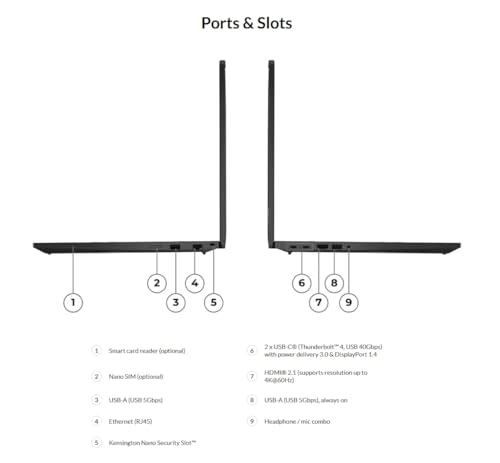
For CAD, prioritize a chassis built for sustained loads: large cooling vents, a rigid lid and deck, sturdy hinges, accessible RAM/SSD slots, and a port layout that works with docks, external monitors, 3D mice, and full-size peripherals. Avoid ultra-thin designs that look powerful on paper but have limited cooling, soldered memory, or weak hinges, because CAD failures often show up as thermal throttling, fan saturation, or downtime when an assembly gets large. Owner feedback generally supports looking for well-made machines with practical features, with many buyers describing their laptops as fast, capable, polished, and strong upgrades or good-quality buys for the money.
Performance
Performance determines how quickly your laptop opens apps, switches between tasks, handles demanding work, and stays responsive in daily use. Look for enough processing power, memory, graphics capability, and storage for what you actually do, and pay attention to cooling and thermals because a powerful laptop that runs hot can slow down, get noisy, or feel uncomfortable over time.
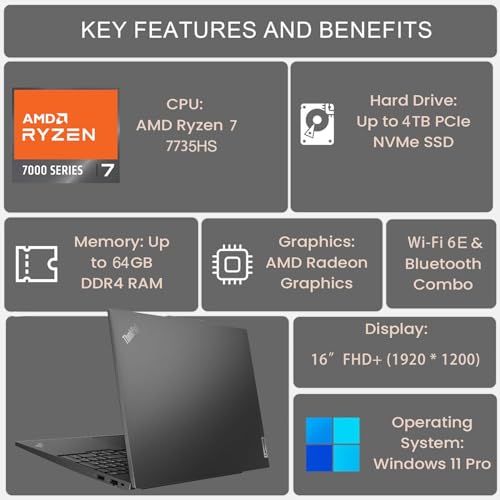
Match the specs to your CAD workload, not just to generic speed claims: 2D drafting and small parametric models need strong single-core CPU performance and at least 16GB RAM, while large assemblies, BIM, simulation, rendering, and point clouds should push you toward 32GB or more, a fast NVMe SSD, and a GPU with enough VRAM. If you use software that relies on certified drivers, check workstation-GPU or ISV certification before buying; gaming GPUs can be strong for viewport and rendering value but may be less predictable in professional CAD packages. Owner sentiment backs the importance of real responsiveness, with buyers repeatedly praising smooth multitasking, fast setup, lag-free everyday work, and strong 1080p gaming-style performance, but those comments should be treated as a floor rather than proof of large-assembly CAD capability.
Value
Value matters because a laptop can look affordable up front but cost you more in compromises like weak performance, limited storage, poor battery life, or build quality that does not hold up. Look for the best balance of speed, screen quality, battery life, ports, and durability for how you actually work or study, and be wary of paying extra for features you will not use.
The best CAD value is not the cheapest fast laptop; it is the one that puts money into RAM capacity, SSD space, cooling, GPU VRAM, warranty support, and upgradeability instead of cosmetic gaming extras or display refresh rates you may not use. Check whether memory and storage can be expanded later, because outgrowing 16GB RAM or a small SSD is one of the quickest ways a CAD laptop becomes expensive to own. Owner reports show buyers often feel high-RAM/high-SSD configurations and capable gaming-class performance deliver strong value, especially when everyday speed and features feel generous for the cost.
Display
Your laptop’s display affects how comfortable it is to read, work, watch, and create, so look for a screen size and resolution that fit both your tasks and how portable you need the laptop to be. Pay attention to brightness, color quality, viewing angles, and glare control, because a sharp screen can still feel frustrating if it looks dim, washed out, or hard to see in your usual environment.
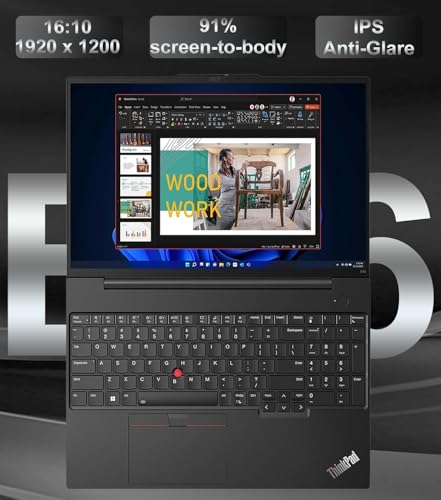
For CAD, look beyond refresh rate: prioritize a sharp 16:10 or higher-resolution panel, good brightness, matte coating, wide viewing angles, and decent color/contrast so linework, dimensions, shaded models, and dense toolbars remain readable. Avoid dim, washed-out, blurry, or low-gamut screens if this will be your primary workspace; high refresh can make motion smooth, but it does not fix poor contrast or cramped resolution. Owner feedback is split in exactly the way CAD buyers should care about: some screens are praised as bright, clear, smooth, matte, and vibrant, while others draw complaints for washed-out, cloudy, dim, or lower-resolution-looking visuals.
Battery
Battery life determines how confidently you can work, stream, or study away from an outlet, so look for runtime that matches your typical day rather than just the biggest advertised number. Watch for real-world factors that drain a laptop faster, such as a bright high-resolution screen, heavy apps, gaming, video calls, or lots of background tasks, and consider charging speed and charger size if you travel often.
Assume serious CAD, rendering, simulation, and GPU-heavy viewport work will require wall power; many laptops reduce CPU/GPU performance on battery, and heavy CAD can drain a pack quickly. Battery life matters most for meetings, markups, travel, and light edits, so check real-world light-use endurance, charger size, and whether USB-C charging is supported for emergency top-ups. Owner sentiment reinforces this caution: battery life is often described as the main watch-out on performance laptops, with better results during basic tasks or eco modes and weaker endurance during gaming or heavy workloads.
Portability
Portability matters because you’ll feel the laptop’s weight and size every time you carry it, move between rooms, or fit it onto a small desk or tray table. Look for a balance between lightweight design and the screen size, ports, keyboard comfort, and battery capacity you need, since the thinnest laptops can sometimes trade away durability, connectivity, or cooling.
For CAD portability, count the whole kit: laptop weight, power brick, mouse or 3D mouse, charger, and any adapters needed for external displays or Ethernet. A 15- or 16-inch laptop is often the practical middle ground for CAD because it can fit stronger cooling and a usable screen, but make sure it still fits your bag and has the ports needed for client sites, classrooms, docks, and monitors. Owner feedback notes that setup can be painless and that some 15.6-inch-class machines still feel light enough to carry, which is encouraging, but CAD shoppers should verify the travel weight and accessory burden before assuming it is truly mobile.
1,000,000+ shoppers use Buyer's Guide every week to find the best products and services online.

Helping millions of users make smarter purchases online.


