


- Screen: 11"
- Resolution: 2420 x 1668
- Processor: Apple M5 10-core
- Storage: 256GB, 512GB, 1TB, or 2TB
- Battery Life: Up to 10 hours
- Camera: 12MP front and rear
- Operating System: iPadOS





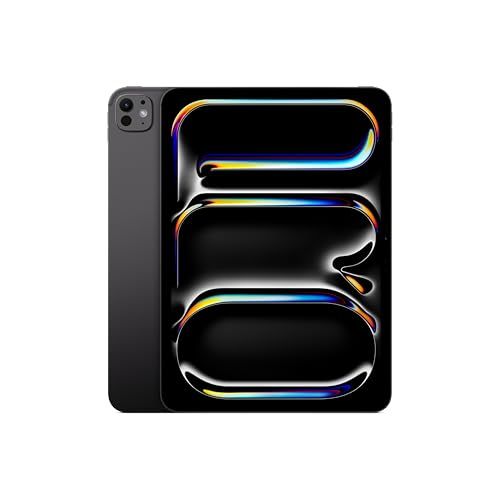
Apple iPad Pro 11-Inch Tablet
Overview and real-world experience

The Apple iPad Pro 11-Inch Tablet is best understood as a device that sits confidently between a traditional tablet and a lightweight laptop replacement. It is not trying to be the cheapest way to browse the web or watch videos, and it rarely pretends otherwise. Instead, the 11-inch iPad Pro aims to deliver top-tier performance, a premium display, excellent portability, and a mature software ecosystem that supports creative work, note taking, media editing, and multitasking in a way most tablets still struggle to match.
In day-to-day use, its speed is the first thing you notice. Apps open instantly, heavy projects feel responsive, and switching between tasks tends to be seamless. Even if you’re not rendering video or working with large design files, the extra performance makes the device feel “effortless,” which is a subtle but meaningful advantage over time. The 11-inch size hits a practical sweet spot: large enough for comfortable split-screen work and immersive reading, but small enough to feel genuinely portable and easy to hold for long sessions.
The display quality is a major part of the experience. Apple’s Pro lineup typically emphasizes smoothness, color accuracy, and clarity, making everything from handwriting with the Apple Pencil to high-frame-rate scrolling feel refined. For artists and photographers, the combination of sharpness and consistent color can make the iPad feel like a trusted canvas. For students and professionals, the readability and responsiveness reduce friction when annotating documents, reviewing PDFs, or jumping between research tabs and note apps.
Audio and cameras also contribute more than you might expect. The speakers are usually strong for a device this thin, giving movies and calls a fuller sound than typical tablets. The cameras are not meant to replace a dedicated camera, but for scanning documents, recording quick video, and taking high-quality calls, they are far more capable than the average tablet setup. In a world where remote meetings are a default, a good front-facing camera and microphones can materially improve how “professional” you look and sound.
Key factors to consider before buying (and what matters most)
Before purchasing the Apple iPad Pro 11-Inch Tablet, the most important step is deciding what role you expect it to play. If you want a premium tablet primarily for browsing, streaming, casual gaming, and email, this model may be more power and expense than you need. If, however, you want a highly portable device that can handle demanding creative apps, serious multitasking, and a long lifespan of fast performance, the iPad Pro’s value proposition becomes clearer.
The first major factor is storage. Many buyers underestimate how quickly space can disappear with high-resolution photos, downloaded movies, offline files, large games, and creative projects. If you plan to edit video, work with large graphics files, or keep lots of media on-device for travel, prioritizing higher storage is often more important than chasing minor spec differences. Cloud storage helps, but it does not fully replace local space when you’re on unreliable Wi‑Fi or dealing with large project files.
The second factor is accessories, because the iPad Pro becomes a very different product depending on what you pair with it. If your goal is note taking, drawing, or annotating documents, the Apple Pencil can be transformative. If your goal is laptop-style productivity, a keyboard case and trackpad can significantly change how you work, especially for writing, email, spreadsheets, and multitasking. The important point is that these accessories add substantial cost, so your real budget should include them if they are central to your plan.
The third factor is software workflow. iPadOS has become increasingly capable for multitasking and professional apps, but it is not identical to macOS or Windows. Some people thrive in a touch-first environment with powerful mobile apps; others run into friction with specific desktop-only tools, niche plugins, or file management habits. The most important thing to consider here is not whether iPadOS is “good” but whether it fits your exact needs. If your work depends on a particular desktop application or requires complex multi-window setups all day, you should confirm the iPad versions meet your expectations before committing.
Connectivity is another purchase-defining choice. Wi‑Fi models are ideal for home, campus, and office use, while cellular options are valuable if you travel frequently, work from cafes, or want always-on access without tethering to a phone. The “most important” angle is reliability: if you need internet to do your job and cannot count on Wi‑Fi, cellular can feel less like a luxury and more like a productivity safeguard.
Finally, consider longevity and resale value. The iPad Pro line tends to remain fast and desirable for years, and Apple’s ecosystem support often helps devices retain value. If you plan to keep the tablet for a long time, investing in the right storage and accessories up front can reduce the urge to upgrade prematurely. The most important buying mindset here is to match the configuration to your long-term usage, not just what feels adequate on day one.
Common Questions
Is the 11-inch size better than a larger iPad for productivity? For many people, yes. The 11-inch model is easier to carry, more comfortable to hold, and still large enough for split-screen multitasking and keyboard work. A larger model can feel more like a laptop screen, but the 11-inch often wins as an everyday, bring-anywhere device.
Can the Apple iPad Pro 11-Inch Tablet replace a laptop? It can replace a laptop for writing, email, research, note taking, presentations, light-to-moderate creative work, and many professional workflows that are supported by iPad apps. It may not replace a laptop if you rely on desktop-only software, specialized peripherals, or complex multitasking that assumes a traditional desktop operating system.
How much storage should I choose? If you mostly stream content, use cloud storage, and do typical productivity tasks, modest storage may be fine. If you download lots of media, keep large offline files, edit photos or video, or install many big games, higher storage becomes one of the smartest upgrades you can make.
Do I really need the Apple Pencil or a keyboard? You only “need” them if they match your intended use. The Apple Pencil is most valuable for students, artists, designers, and anyone who annotates documents frequently. A keyboard case is most valuable if you expect to type a lot, manage documents, and treat the iPad as a primary work device.
Is Wi‑Fi enough, or should I consider cellular? Wi‑Fi is enough if you spend most of your time in reliable coverage areas and don’t mind occasional tethering to a phone. Cellular is worth it if you travel, commute, work on the go, or simply want internet access that is consistent and independent of hotspots.
As a premium tablet, the Apple iPad Pro 11-Inch Tablet excels at delivering a fast, polished experience in a highly portable form. The most important purchase decisions come down to choosing the right storage, deciding whether the Pencil and keyboard are essential to your workflow, and being honest about whether iPadOS fits the way you work. If those pieces align, the 11-inch iPad Pro is one of the most capable and enjoyable tablets available, with the performance and refinement to stay satisfying well into the future.