


- Screen: 11"
- Resolution: 2360 x 1640
- Processor: A16 Bionic 6-core
- Storage: 128GB, 256GB, or 512GB
- Battery Life: Up to 24 hours
- Camera: 12MP front and rear
- Operating System: iPadOS





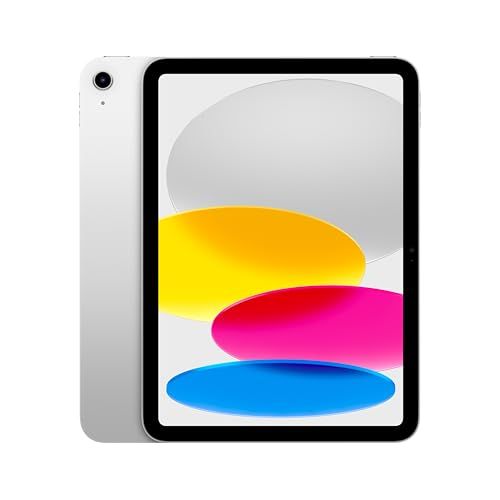
Apple iPad 11-Inch Tablet
Overview and Everyday Experience

The Apple iPad 11-Inch Tablet sits in a sweet spot for people who want a device that feels spacious for reading, writing, and entertainment without becoming awkward to hold for long periods. The 11-inch form factor is large enough to comfortably view documents, edit photos, take handwritten notes, and multitask with split-screen apps, yet still portable enough for commuting, travel, and moving room to room at home. In day-to-day use, the defining experience is how quickly the iPad wakes, how fluid scrolling and animations feel, and how reliably apps behave when switching between tasks. For many buyers, that “instant-on” convenience becomes more valuable than raw specifications because it changes how often you reach for the device.
Performance on modern iPads is generally strong, and for typical workloads such as web browsing, streaming, email, schoolwork, and light creative tasks, the iPad feels fast and stable. Where the 11-inch model often shines is in its versatility: it can be a couch-friendly screen for movies, a kitchen companion for recipes, a classroom notebook, and a casual gaming device. If you lean into Apple’s ecosystem, features like syncing photos and notes, receiving messages, and handing off work between devices can make the iPad feel like an extension of your phone or computer rather than a separate gadget you have to manage.
The display experience is a major part of the appeal. An 11-inch screen gives you comfortable text sizes at normal viewing distances and enough room to use two apps side by side without feeling overly cramped. Color, brightness, and clarity are typically strong on iPads, which matters not only for watching content but also for reading for long stretches without fatigue. Audio also plays a role in daily enjoyment; iPads tend to produce surprisingly full sound for their size, which can reduce the need for external speakers when watching videos or taking video calls. Cameras are not usually the main reason to buy an iPad, but they matter for scanning documents, augmented reality apps, and video conferencing, and the iPad format can be especially handy for quickly capturing and sharing information.
What to Consider Before Buying
The most important factors usually come down to intended use, storage, accessories, and connectivity. Start with your primary jobs for the tablet. If your needs center on streaming, browsing, reading, and casual gaming, you’ll likely be satisfied with a wide range of configurations. If you plan to use the iPad as a laptop substitute for school or work, factors like keyboard support, multitasking behavior, and app availability become more important than raw speed alone. Creative users should also think about how much they rely on specific apps for illustration, photo editing, music, or video, and whether the iPad versions of those apps match their expectations compared to desktop tools.
Storage is one of the most frequently underestimated considerations, and it’s often more important than small differences in processor performance for most buyers. If you mainly stream and use cloud storage, a lower capacity may work fine. If you download large games, keep lots of photos and videos locally, or store offline media for travel, more storage will save frustration later. Because iPad storage typically can’t be expanded with a card slot, choosing the right amount up front matters. A good way to decide is to look at the storage used on your current phone or computer and consider whether you want the iPad to carry similar loads, especially if you plan to use it for video downloads, art files, or school materials.
Accessory costs can meaningfully change the value equation. Many people end up wanting a keyboard case for typing or a stylus for handwriting and drawing. If your plan includes note-taking, sketching, or precise selection and markup, confirming compatibility with Apple Pencil or other styluses should be a priority. Similarly, if you plan to write long documents, a comfortable keyboard and a stable stand become essential, and the combined price can push the total closer to that of a laptop. It’s worth deciding early whether you want the iPad to be mostly a handheld tablet or a “tablet-laptop hybrid,” because that affects both budget and the model configuration you choose.
Connectivity is another key decision. Wi‑Fi-only models are usually the best value for people who mostly use the iPad at home, in the office, or on campus with reliable networks. A Wi‑Fi + cellular model can be transformative if you travel, work in the field, or want always-on access without tethering to a phone. However, cellular adds upfront cost and often a monthly plan, so it’s best justified by frequent use. Also consider the types of ports and charging you rely on. If you use external drives, cameras, monitors, or audio interfaces, you’ll want to make sure your accessory ecosystem works smoothly with the iPad’s connection options and the adapters you’re willing to carry.
Battery life is generally strong on iPads, but the most important nuance is how you use them. Video streaming at moderate brightness is different from heavy multitasking, high-brightness outdoor use, or using power-hungry creative apps. If you frequently take long video calls, edit media, or play demanding games, expect shorter runtimes than headline numbers. The most important battery-related factor is not the best-case estimate, but whether the iPad reliably makes it through your typical day without forcing you to plan around charging.
Finally, software and longevity can be more important than many shoppers realize. iPadOS has a distinctive approach to multitasking and file management, and while it has improved over time, it still differs from macOS or Windows in ways that may matter if you need certain workflows. On the other hand, iPads tend to receive updates for years, which supports long-term value and resale. For many people, the most important purchase considerations are storage capacity, accessory needs, and whether the iPad’s software fits the way they want to work, with connectivity as a close runner-up depending on lifestyle.
Common Questions
Is the Apple iPad 11-Inch Tablet good for replacing a laptop?
It can be, depending on what you do. For writing, email, web apps, note-taking, and many school tasks, an iPad with a good keyboard case can cover a lot of ground. If you rely on specialized desktop software, complex file workflows, or heavy multitasking across multiple external displays, a traditional laptop may still be the better primary computer.
How much storage should I get?
If you mostly stream content and use cloud storage, a lower-capacity model can work. If you download movies for travel, install large games, store lots of photos and video, or keep creative projects on-device, choosing more storage upfront is usually the smarter move because you can’t add more later with a memory card.
Do I need Wi‑Fi + cellular, or is Wi‑Fi enough?
Wi‑Fi is enough if you’re usually near reliable networks and don’t mind tethering to your phone occasionally. Cellular is worth it if you frequently travel, work away from Wi‑Fi, or want your iPad to be reliably connected without depending on your phone’s battery and hotspot setup.
Is an Apple Pencil worth buying?
It’s worth it if you plan to take handwritten notes, annotate PDFs, sketch, or do precise editing. If your iPad use is mostly typing, reading, and watching videos, the Pencil may be a nice-to-have rather than essential.
Overall, the Apple iPad 11-Inch Tablet is an impressively balanced option that excels at being a flexible, always-ready device for entertainment, learning, and light-to-serious productivity. The best buying decision comes from matching your configuration to how you’ll actually use it, with storage, accessory plans, and connectivity being the most consequential choices for long-term satisfaction.