



















We also considered 9 others:





Our Top Choice
Compare Features


The order above is not editorial opinion, and it is not paid placement. It comes from what shoppers across our network actually do - which 43-inch led tvs they compare, and which they ultimately buy. We re-rank as new data comes in, so the long-term favorites have to keep earning their spot against new entrants. The full method, including how we make money.
43-Inch LED TVs Buyer's Guide
A 43-inch LED TV is usually bought to solve a space problem: it needs to feel big enough for movies or games while still fitting a bedroom dresser, dorm desk, kitchen wall, or small office. The sharpest checks are physical fit, port access after mounting, smart-TV responsiveness, and whether the picture and sound hold up at the short viewing distances common in this size.
Controls
You’ll interact with a smart TV every time you turn it on, switch apps, adjust picture settings, or search for something to watch, so the controls can make a big difference in daily satisfaction. Look for a remote that feels intuitive, menus that are easy to navigate, and a system that responds quickly without lag; watch out for cluttered settings, buried options, or controls that make simple tasks feel slow.
For a 43-inch TV that may sit in a bedroom, dorm, kitchen, or guest room, prioritize controls that work cleanly from awkward angles and low light: a remote with distinct navigation, volume, mute, input, and subtitle buttons; reliable input switching for a console, cable box, or sound bar; and a phone-app backup in case the small remote gets misplaced. If the TV will be used by guests, kids, or less tech-comfortable viewers, avoid models that bury basic controls inside voice menus or require too many home-screen steps just to change inputs. Owner feedback suggests setup and daily streaming are usually approachable, with guided Wi-Fi and account restoration helping, but the remote itself is a recurring weak spot when it feels too sensitive, laggy, or unintuitive.
Features
Smart features determine how easily you can find, stream, and control the content you actually watch, so look for a clear interface, broad app support, reliable voice or remote controls, and smooth casting or device integration. Also watch for sluggish menus, missing services, limited update support, or features that sound impressive but do not improve everyday use.
Match the feature set to the exact room role: for a dorm or rental, check captive-portal Wi-Fi support, Bluetooth headphone output, and easy factory reset; for a bedroom, look for sleep timer, brightness controls, caption access, and private listening; for a console or sound bar, confirm enough HDMI ports, ARC/eARC support, and side-facing ports that remain reachable after wall mounting. Do not assume every 43-inch LED TV has the same smart platform speed, app support, tuner capability, or gaming features; many are 60 Hz sets, so serious gamers should verify low input lag, game mode, and the actual HDMI standard. Owners often find setup quick and connections to Wi-Fi, apps, consoles, and sound bars straightforward, but sentiment is more mixed around smart features, Wi-Fi, sound, and day-to-day functionality than around picture or size.
Picture
Picture quality determines how clear, natural, and immersive everything looks, from dark movie scenes to bright sports broadcasts. You should look for a TV with accurate color, strong contrast, enough brightness for your room, and good motion handling, while watching out for sets that look vivid in a showroom but make skin tones, shadows, or fast action appear unnatural.
At 43 inches, the biggest picture decision is whether the set will be viewed close enough to benefit from 4K; for desks, bedrooms, and small apartments, 4K can make text, menus, and games look cleaner, while 1080p can still look fine from farther across a room. Check panel type and room lighting: VA-style panels usually favor contrast for dark rooms but can wash out from the side, while IPS-style panels usually hold up better off-axis but may look grayer in dark scenes. Also verify real HDR capability rather than just HDR compatibility, because many small LED TVs accept HDR signals without getting bright enough for dramatic highlights. Owner sentiment strongly supports picture as this category’s strength, with many buyers praising crisp, clear, vibrant images, good contrast, brightness, and surprisingly strong movie or gaming performance.
Quality
You want a smart TV that feels well built, runs consistently, and keeps delivering stable performance after the novelty wears off. Look for signs of solid construction, dependable software behavior, sturdy ports and stand hardware, and owner feedback about long-term reliability; watch out for reports of freezing, random restarts, loose panels, weak stands, or performance that degrades with regular use.
For 43-inch TVs, quality is less about heft and more about long-term responsiveness, panel uniformity, and whether the lightweight chassis flexes, buzzes, or wobbles on a narrow stand. Before buying, check return-window policies for dead pixels, dirty-screen effect, backlight bleed, Wi-Fi dropouts, and sluggish menus, because these are the failures that most affect a small everyday TV. If wall mounting, confirm the VESA pattern, screw depth, weight, and whether ports will be blocked by a fixed mount. Owners generally see these TVs as solid, good-quality sets for bedrooms, offices, cabins, dorms, and quick replacements, with praise for picture, brightness, sound, and build experience; the main reliability watch-out is responsiveness, including laggy menus, slow remote reactions, stuttering, or inconsistent smart-TV behavior.
Setup
Setup matters because a smart TV can be large, fragile, and awkward to position, especially if you plan to wall-mount it or connect multiple devices. Look for clear instructions, stable stand assembly, accessible ports, straightforward Wi-Fi and account sign-in, and a guided on-screen setup that helps you tune channels and configure picture, sound, and apps without guesswork. Watch out for TVs that require extra tools, uncommon mounting hardware, or two-person lifting beyond what your space and setup plan can handle.
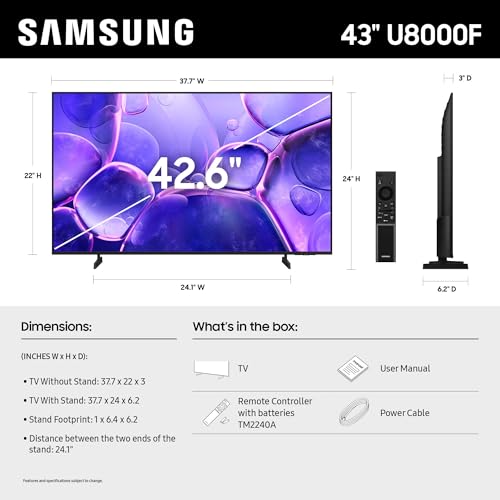
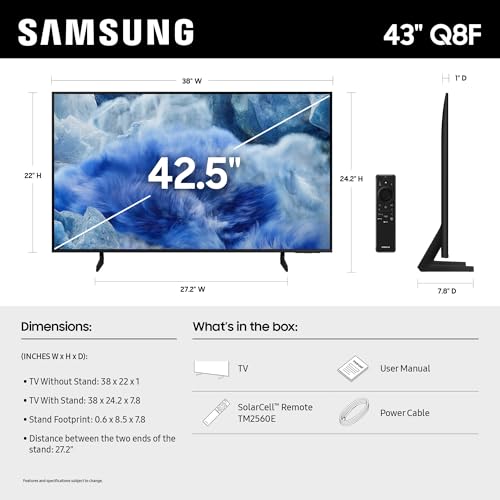
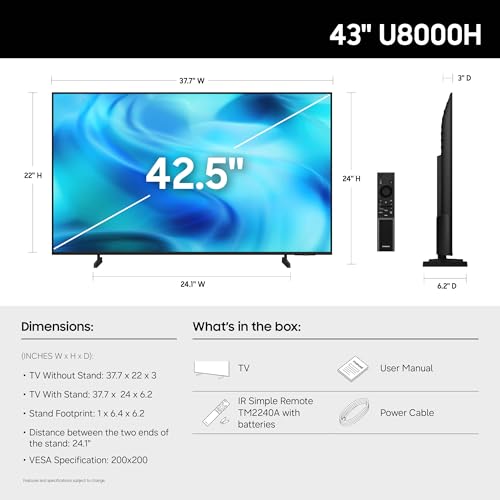
Measure the real fit before setup: a 43-inch screen is roughly 38 inches wide, and the stand feet may be wider than expected, so confirm furniture width, cable clearance, and wall-mount placement before the box is opened. If it is going into a dorm, office, RV, or secondary room, verify Wi-Fi compatibility, sign-in requirements, antenna/cable inputs, and whether the TV can be used without creating or restoring a smart account. For wall mounting, choose side-accessible HDMI and USB ports or plan right-angle adapters. Owners consistently describe setup as simple, quick, and approachable, with Wi-Fi, consoles, apps, and sound bars generally connecting without much trouble.
Sound
Sound quality affects how clear dialogue, music, and effects feel, especially when you’re watching movies, sports, or shows without extra speakers. Look for a TV that can get loud enough for your room without sounding harsh, thin, or distorted, and pay attention to whether voices remain easy to understand. If the built-in speakers seem weak or lack bass, plan on pairing the TV with a soundbar or external audio system.
A 43-inch LED TV has limited speaker space, so treat built-in audio as acceptable for casual viewing but verify dialogue clarity, night mode, headphone/Bluetooth support, and an audio output that matches your sound bar or receiver. For bedrooms and apartments, look for volume leveling and clear speech modes; for wall-mounted use, avoid relying on downward-firing speakers if the TV will be enclosed or mounted high. If using external audio, confirm ARC/eARC, optical output, Bluetooth latency, and whether the TV remote can control the sound system. Owner feedback is mixed: some buyers are pleasantly surprised by loud or excellent built-in sound and easy sound-bar output, while others find the speakers flat or run into connectivity issues with wireless or smart-home audio pairing.
1,000,000+ shoppers use Buyer's Guide every week to find the best products and services online.

Helping millions of users make smarter purchases online.


